





You face a critical decision in 2026: choosing between Windows and macOS. Each system offers distinct advantages in performance, security, and software compatibility. While Windows provides broader hardware options and gaming support, macOS delivers superior integration and long-term stability. Your workflow, budget, and ecosystem needs will determine the best fit.
The Silicon War
Apple’s Shift to Custom Chips
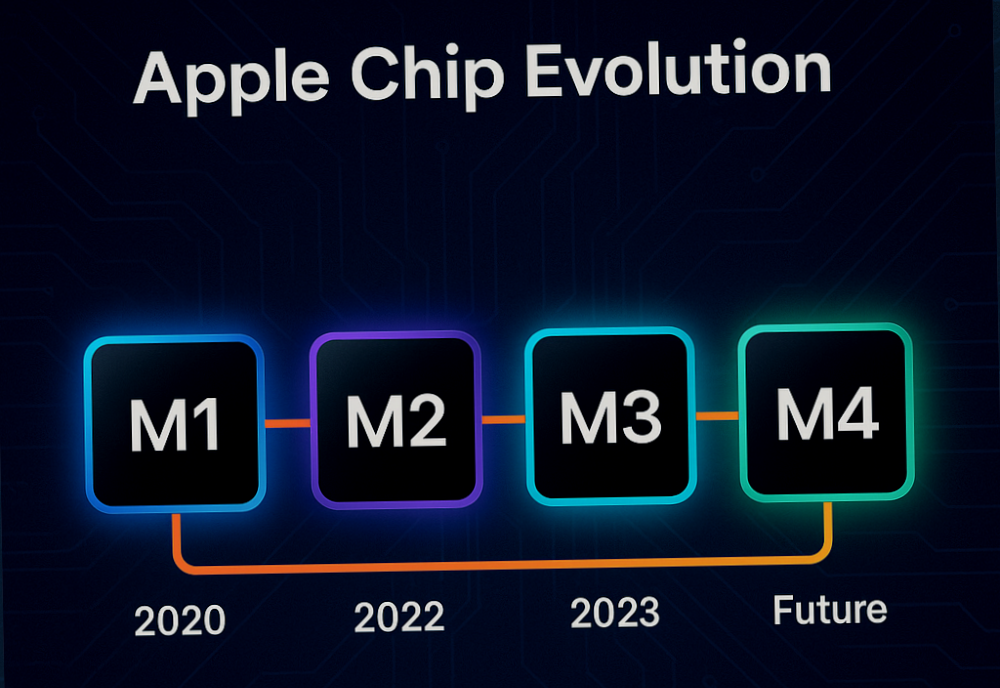
You’ve likely heard how Apple’s move to its own silicon changed the game. Starting with the M1 chip in 2020, Apple began replacing Intel processors across its Mac lineup, and by 2026, the transition is complete. These custom-designed ARM-based chips deliver unmatched performance per watt, allowing MacBooks to run faster and cooler than ever. Battery life has surged, with some models lasting over 20 hours on a single charge-something Windows laptops are still chasing. The tight integration between macOS and Apple’s silicon enables optimizations that third-party hardware simply can’t replicate.
Windows Fights Back with AI and Performance
Intel and AMD haven’t stayed idle. In response to Apple’s dominance in efficiency, both have pushed aggressive updates to their processor lines, with Intel’s Lunar Lake and AMD’s Zen 5 architectures now powering high-end Windows laptops in 2026. These chips bring AI acceleration directly into the CPU, supporting local generative AI tasks without relying on the cloud. While they still lag behind Apple in battery efficiency, they offer more raw power for creators and gamers who need multi-core performance. Windows on ARM is also gaining traction, especially with Microsoft’s Surface devices using Qualcomm’s Snapdragon X Elite-proving that x86 isn’t the only path forward.
The Software Divide Widens
Performance isn’t just about hardware-it’s how the system uses it. Apple’s control over both chip and OS means macOS can prioritize responsiveness and security at a foundational level. Features like rapid wake from sleep, instant app launches, and silent operation are now baseline expectations on Macs. On Windows, even high-end devices can feel sluggish due to background processes and driver inconsistencies. While Microsoft has improved memory management and background task handling in Windows 12, the fragmentation of hardware configurations still leads to unpredictable experiences. You’ll get the best results only when pairing top-tier chips with well-optimized software.
What It Means for Your Choice
Your decision in 2026 hinges on what kind of user you are. If you value long battery life, quiet operation, and a tightly integrated experience, Apple’s silicon gives macOS a clear edge for productivity and creative workflows. But if you need maximum hardware flexibility, support for legacy software, or demand high-end gaming and virtualization, Windows on modern x86 or emerging ARM platforms remains the more adaptable option. The gap in efficiency is real, but so is the breadth of choice Windows offers. The silicon war isn’t over-it’s just entered a new phase where both sides have compelling reasons to win you over.
The Artificial Intelligence Core
On-Device Intelligence: Where Your Data Stays Yours
Apple continues to refine its Neural Engine with every new generation of Macs, embedding dedicated AI hardware directly into the M-series chips. You benefit from faster, more efficient machine learning tasks-like photo recognition, voice processing, and predictive typing-without sending your data to the cloud. This means your private conversations, personal photos, and sensitive documents remain on your device, protected by end-to-end privacy architecture that macOS enforces by default. The system learns your habits without exposing them, giving you a personalized experience that doesn’t compromise security.
Windows AI: Power Through Integration
Microsoft is betting big on AI with Copilot deeply woven into Windows 11 and expanding into Windows 12’s preview builds. You interact with your PC through natural language, automate complex workflows, and get real-time assistance across Office, Edge, and third-party apps. While this creates a highly responsive and adaptive interface, it relies heavily on cloud connectivity and Microsoft’s servers to process many of these requests. If you value speed and broad functionality over absolute local control, this model delivers-but be aware that some data may be logged or analyzed to improve the service, depending on your privacy settings.
Performance and Privacy: Your Trade-Off
Your choice here isn’t just about speed or features-it’s about how much control you want over your own information. macOS treats AI as a silent assistant that operates within the boundaries of your machine, minimizing exposure. Windows treats it as a connected partner, pulling in external intelligence to enhance your productivity. If you work in regulated industries or handle sensitive personal data, the Apple approach may feel more secure. But if you’re comfortable with measured data sharing and want cutting-edge AI features today, Windows offers broader integration across platforms and services.
The Experience of Use
Day-to-Day Interaction
You interact with your operating system every time you open an app, switch tasks, or adjust settings. Windows 11 has refined its interface with smoother animations, centered taskbars, and improved touch gestures, making it more approachable on both laptops and 2-in-1 devices. Still, occasional inconsistencies in design language-especially when legacy apps appear-can disrupt the flow. macOS Sonoma, by contrast, delivers a remarkably consistent experience across all native applications, with fluid transitions and intuitive menu behaviors that reflect years of refinement. You’ll notice fewer visual hiccups and a stronger sense of cohesion when moving between Mail, Safari, and third-party software optimized for Apple’s ecosystem.
Performance and Responsiveness
Speed isn’t just about boot times-it’s how quickly your system wakes from sleep, responds to keyboard shortcuts, and handles multitasking. On modern hardware, both platforms perform well, but macOS often feels more predictably responsive, especially on Apple Silicon Macs. These chips are tuned specifically for the OS, allowing for efficient power use and near-instant app launches. Windows runs on a vast range of hardware, which means performance can vary dramatically. A high-end gaming laptop might outpace a MacBook Air in raw power, but a budget OEM device could suffer from sluggish updates and background bloat. You’re more likely to experience unexpected slowdowns on Windows if the manufacturer hasn’t optimized drivers or preinstalled software.
Customization and Control
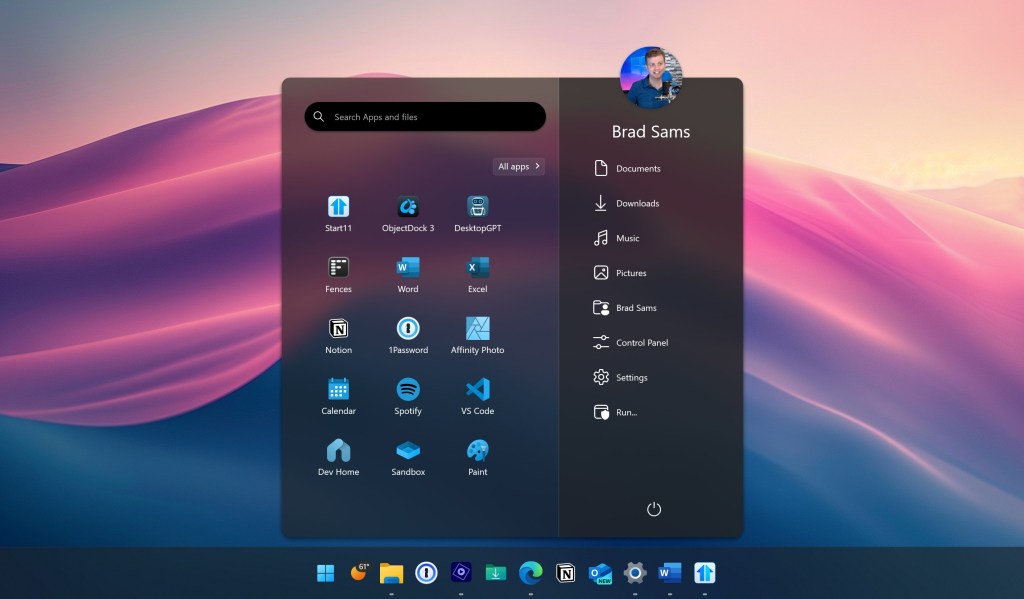
Windows gives you deep access to system settings, file structures, and personalization options. You can change almost every visual element, install third-party shells, or automate tasks with scripting tools. This level of control is empowering if you want to tailor your environment, but it also opens the door to system instability if misconfigured. macOS takes a more restrained approach. You have fewer visual customization options, but the trade-off is a more stable, secure environment. System integrity protection and app sandboxing limit what software can do behind the scenes, reducing the risk of malware or performance degradation. For most users, this means less maintenance and fewer surprises.
Ecosystem Integration
Your choice of OS affects how well your devices work together. If you use an iPhone, iPad, or Apple Watch, macOS offers seamless handoff, universal clipboard, and instant hotspot-features that just work without extra setup. You can start an email on your iPhone and finish it on your Mac, or answer a FaceTime call from your laptop. Windows has improved its ecosystem with Phone Link and Nearby Share, but the experience with Android is inconsistent, and iPhone integration remains limited. You won’t be able to mirror your iPhone screen or reply to iMessages natively, which can be a dealbreaker if you’re deeply invested in Apple’s ecosystem.
The Gaming Divide
Performance and Game Availability
With respect to raw gaming performance, Windows remains the dominant platform in 2026. You’ll find access to the largest library of games, including AAA titles, indie hits, and backward-compatible classics, often on day one. Most game developers prioritize Windows due to its widespread adoption, meaning you’re more likely to get early access to new releases, mod support, and performance optimizations. macOS, while improving with Apple’s M-series chips, still lags behind in native game support. Many popular titles either don’t launch on macOS or arrive months later, limiting your options if you’re eager to play the latest releases.
Hardware Flexibility and Upgrades
Windows gives you the freedom to build or buy a machine tailored to your gaming needs. You can upgrade components like GPU, RAM, and storage over time, extending the life of your system and keeping up with evolving game requirements. This flexibility is unmatched on the Mac side, where hardware is sealed and non-upgradable. Even high-end Macs like the MacBook Pro or Mac Studio aren’t designed for gaming workloads, and their integrated cooling systems can throttle performance during extended sessions. If you want maximum frame rates and future-proofing, Windows PCs offer a clear advantage.
Cloud and Ecosystem Workarounds
macOS users aren’t completely locked out of the gaming world. Cloud services like Xbox Cloud Gaming, GeForce Now, and Boosteroid let you stream high-end games to your Mac, bypassing hardware limitations. However, this depends heavily on a stable, high-speed internet connection, and you lose the offline flexibility and low-latency responsiveness of local gaming. While Apple has made strides with MetalFX and game ports through developers like Aspyr, the ecosystem still feels like an afterthought compared to Windows’ full-featured gaming infrastructure. For serious gamers, this gap remains a significant drawback.
Real-World Experience Matters
If you’re switching from Windows to macOS, it’s worth hearing from someone who’s been through it. In this candid piece, I Switched to Mac After Years on Windows. Here Is What …, the author shares how gaming expectations clashed with reality. The lack of native titles and the frustration of workarounds became a daily limitation, especially for someone used to plug-and-play gaming on Windows. Their experience underscores a key truth: macOS is powerful for many tasks, but gaming still requires compromises you may not be ready to make.
Security in a Connected World
Threats You Face Every Day
You interact with digital threats more often than you realize-phishing emails, malicious downloads, and unsecured Wi-Fi networks are constant risks. Windows, due to its widespread use, remains a prime target for malware and ransomware attacks. Cybercriminals exploit its broad user base, making vigilance imperative if you rely on Windows for work or personal use. While Microsoft has strengthened built-in protections like Windows Defender and SmartScreen, the sheer volume of attacks means you must stay proactive with updates and third-party tools.
macOS benefits from a more locked-down architecture and a smaller market share, which naturally reduces its exposure to mass-scale attacks. Apple’s strict app review process for the App Store and mandatory notarization for third-party software create stronger barriers against malicious code. You’re less likely to encounter widespread viruses on macOS, but that doesn’t mean you’re immune. Social engineering and zero-day exploits still pose real dangers, especially as Apple devices become more popular among professionals.
How Updates Shape Your Safety
Timely updates are your first line of defense, and here macOS often holds an edge. Apple controls both hardware and software, allowing it to push security patches quickly across nearly all supported devices. You typically receive critical fixes within days of discovery, minimizing your window of exposure. In contrast, Windows relies on a fragmented ecosystem of OEMs and drivers, which can delay patch rollouts-leaving some systems vulnerable for weeks or even months.
Your behavior also determines how effective these updates are. Even the most secure system fails if you ignore update notifications or disable automatic installations. Both platforms now offer automatic background updates, but Windows gives you more control over timing-useful in enterprise settings, but risky for less technical users who may postpone patches indefinitely. With macOS, the system prioritizes security over user delay, forcing updates in many cases to protect you from emerging threats without relying on your action.
Privacy: What They Know About You
Microsoft collects usage data to improve Windows performance and personalize services, but this means your activity is tracked across apps, search, and cloud integrations. You can limit this through privacy settings, but the default configuration leans toward data collection. If you value discretion in your digital footprint, this requires careful tuning during setup and periodic review.
Apple has positioned itself as a privacy-first company, and macOS reflects that stance. Features like app tracking transparency, on-device processing for Siri, and iCloud Private Relay help ensure your personal information stays out of corporate databases. While no system is entirely private, macOS gives you more built-in tools to control what’s shared and with whom. If data minimization matters to you, Apple’s approach aligns more closely with that priority.
The Financial Cost
Upfront Hardware Expenses
Windows gives you far more flexibility in price range, letting you choose a device that matches your exact budget. You can find capable Windows laptops starting under $400, while high-end models from Dell, Lenovo, or ASUS compete with MacBooks at the $2,000+ mark. Apple, on the other hand, maintains a premium pricing strategy-its entry-level MacBook Air starts at $999, and prices climb quickly with upgrades. If you’re watching your wallet closely, Windows offers a clear advantage in affordability, especially for students or casual users who don’t need top-tier performance.
Long-Term Value and Resale
Mac hardware tends to hold its value better over time, meaning you can recoup a larger portion of your investment when selling or trading in your device. A well-maintained MacBook from three years ago might still fetch 50-60% of its original price, while most Windows laptops depreciate faster, often dropping below 30%. This doesn’t mean Macs are cheaper in the long run, but their resale resilience can offset the higher initial cost. If you upgrade every few years, this factor becomes a meaningful part of your total ownership expense.
Software and Subscription Costs
You’ll find that macOS includes a full suite of free, high-quality apps-like iMovie, GarageBand, Pages, and Keynote-right out of the box. Windows machines often come with trial versions or limited functionality software, nudging you toward paid subscriptions. While Microsoft 365 adds powerful tools, it costs $70 per year for personal use, and that recurring fee adds up over time. On a Mac, you get capable native alternatives at no extra charge, which can be a significant saving if you rely on productivity or creative software.
Repair and Maintenance Expenses
Fixing a Mac can be more expensive, especially once you’re outside the warranty period. Apple’s proprietary designs and limited repair options mean you’re often dependent on authorized service providers, where a screen replacement or battery fix may cost hundreds. Windows devices vary widely-some brands offer user-replaceable parts and better third-party support, letting you save money with DIY fixes. However, high-end Windows laptops from Microsoft or Dell can carry similar repair costs to Macs, so your choice of model matters more than the OS alone.
Summing up
Now you understand that your choice between Windows and macOS in 2026 depends on your workflow, device preferences, and software needs. Windows offers broad hardware variety, backward compatibility, and strong support for gaming and enterprise applications. You can find a Windows laptop or desktop at nearly any price point, and its flexibility suits users who rely on specific programs or need to customize their setup extensively.
macOS delivers a tightly integrated experience across Apple devices, with consistent performance, strong privacy controls, and optimized software for creative professionals. If you use an iPhone, iPad, or rely on tools like Final Cut Pro or Logic Pro, macOS provides a smooth, reliable environment. System updates are predictable, and Apple’s shift to its own chips has improved battery life and responsiveness across the board.
You must weigh compatibility, ecosystem loyalty, and long-term usability. Neither platform dominates outright-your decision hinges on how you work, what software you depend on, and which hardware fits your lifestyle. By 2026, both systems will continue evolving, but your personal needs should guide the final call.
FAQ
Q: What are the key differences between Windows and macOS in 2026?
A: Windows runs on a wide range of hardware from multiple manufacturers, offering flexibility in price, performance, and design. Users can find devices from budget laptops to high-end gaming rigs. macOS is exclusive to Apple hardware, meaning it only runs on MacBooks, iMacs, and Mac desktops. This tight integration between software and hardware often results in smoother performance and longer software support. Windows supports more software overall, especially in gaming and enterprise tools, while macOS is known for its stability, strong privacy controls, and optimized apps for creative work like video editing and music production. The user interface also differs-Windows uses a start menu and taskbar, while macOS relies on the Dock and Menu Bar at the top of the screen.
Q: Which operating system is better for creative professionals in 2026?
A: Many creative professionals still lean toward macOS due to its optimized performance with apps like Final Cut Pro, Logic Pro, and Adobe Creative Cloud. Apple’s M-series chips deliver strong efficiency and battery life, which benefits video editors and designers working on the go. Color accuracy on Mac displays is consistently high, and the ecosystem integrates well with iPhones and iPads, making file sharing and continuity features like Handoff useful. That said, high-end Windows laptops like the Surface Studio or Dell XPS models now offer excellent screens and performance. Some specialized creative tools, especially in 3D modeling or animation, run better or exclusively on Windows. The choice often comes down to preferred software and workflow rather than raw capability.
Q: Is Windows or macOS more secure and easier to maintain in 2026?
A: macOS has a reputation for stronger built-in security thanks to Apple’s controlled ecosystem, regular updates, and limited attack surface. Features like System Integrity Protection and app sandboxing reduce the risk of malware. Windows has improved significantly over the years with Windows Defender, hardware-based security like TPM, and frequent updates. However, because Windows runs on so many devices and is more widely used, it remains a bigger target for malware and phishing attacks. Maintenance-wise, macOS tends to feel simpler-updates are consistent across devices, and system clutter is less common. Windows offers more customization but may require more user attention over time to manage drivers, updates, and third-party software. Both systems are reliable when kept up to date, but macOS often feels more hands-off for average users.